Saturday, February 20, 2016

How to easily pass Free Code Camp's Algorithm Scripting challenges - OR - Why you shouldn't use the browser challenges

New coaching testimonial coming on Sunday!

While researching Free Code Camp ( It changes quickly so I wanted to make sure what I was saying was up to date ), I found out some issues with the browser based scripting challenges that really bothers me.  As of last year, I was able to use the Ramda.js library in the browser challenges online.

I tried every way to call/require the Ramda.js or Lodash.js libraries without any success.  I searched online for 30 minutes trying to figure out how to use Ramda.js with the online coding challenges and couldn't find any information.  I personally think the Ramda.js library was removed.  Either way, it should not be this hard to figure out how to use a Javascript library like Lodash or Ramda with the challenges.

I know as of August last year (2015) Quincy Larson said on Quora that you could use Ramda and Lodash in the online challenges:
https://www.quora.com/What-are-some-websites-to-practice-mini-problems-for-coding

I also can show you how I used Ramda.js last year with Free Code Camp online challenges:
https://github.com/joshuakemp1/FREE-CODE-CAMP/tree/master/ecc


I hope I am wrong, I hope someone will clear up this issue and show me how to use Ramda.js with Free Code Camp, without it, I don't think you should use the online editor.  I recommend copying and pasting the challenge into a text editor and then using Lodash or Ramda libraries.

The article below is how I used to easily solve the Free Code Camp challenges, hopefully, this will help you solve the challenges easier or switch over to Ruby :-)


This was my original post as of a month ago.

I've been asked by many people to write how to pass the Free Code Camp scripting challenges.  Here goes:


NOTE:  I love Free Code Camp's Algorithm challenges and recommend them to my coaching clients all the time.


There are several reasons why Free Code Camp's challenges are hard:


  • When you run your code you don't get to see the output ( sometimes you get some sort of output, put it's not the same as running it in a REPL on your terminal ).
  • You can use the Ramda.js Library but it is not advertised on the site at all.
  • Nowhere does it tell you on Free Code Camp how to call the Ramda.js Library.
  • Why would you have a Javascript library built into the Bonfire Algorithm challenges but not tell beginners how to call a Library?
  • Using built-in methods is frowned upon in the community, using nested loops is considered better and more 'vanilla Javascript'.


8 steps to solve them easily

Here's how to get around these issues:

(1)  As soon as you get to Bonfire Algorithm Challenge, the very first thing to do is click on the 'Run tests' button.

You want to find out all of the edge cases that you need to solve with your code. Leave this browser window open to reference.

(2)  Next copy and paste the Bonfire Algorithm Challenge code into your text editor.  This is where you will actually work on solving the challenge.  Once you solve one of the cases you need to solve for the challenge, paste it into the browser and run the tests.  Using this approach you will eventually solve the entire challenge.

(3)  Look at the 'helpful links', they are basically the methods you will be using to solve the challenge.  NOTE:  This is the best new feature that Free Code Camp has added lately, this is exactly what I used to do in the past, look for a Javascript method that could solve the challenge first before doing anything else.


(4)  Next look at Ramda.js Docs and see if you can find a built-in method that you can use to solve or partially solve the challenge.


(5)  Make sure you test that you are requiring and using the Ramda.js library correctly on your local machine.  First install Ramda with NPM, if you don't have NPM you will need to install Node.js.  After installing Node and Ramda, open the REPL from the command line and make sure you can access the Ramda methods.

(6)  Always be checking your codes output.  Use 'console.log' all through your code if you don't know what something is doing or want to see output for a particular piece of code.

(7)  Always avoid using multiple nested loops if possible as your solution.  No company will ever want you writing code like that in production.  Ignore people who say to learn that way first and then use methods.  Everytime you use a loop you add another layer of complexity to your code, use the built-in methods as much as possible.

(8)  First try to solve the challenge anyway possible, if you get it solved, then see if you can clean up your code or solve the challenge in a cleaner way.  Don't strive for perfect when you are just starting out.  Focus on completion and solving the challenge first, pretty second.


Learn to use your REPL and local machine instead of relying on the Free Code Camp online editor.  Focus on the output of your program and try to slowly solve one piece of the challenge at a time.  Never get discouraged, if it takes you 3 days to solve a challenge that's okay, you will have learned a lot about coding in those 3 days.  Don't worry if someone else can solve a challenge in 3 minutes, they have probably seen similar challenges before.


Keep coding peeps, you can do this!!!


Friday, February 5, 2016

Why you should learn to code but not become a developer

I sell several copies of my book everyday that promises you can learn to code and land a Rails job.  That is still true.  What I am saying with the title of this blog, is this:  

It is soo much easier to learn how to code and land a QA or Test Automation position, than it is to start out as a full blown developer.  Being able to solve basic coding algorithms on Free Code Camp is not the same as being a developer.  NOTE:  Free Code Camp is great, this is not about them.


At my first job, I wore many hats, did some email management of the support Queue, did some testing, some front end work but it wasn't a full blown developer only position.  At my second job I did test automation which basically meant I was using Ruby to keep track of performance metrics and wrote several different scripts that solved/tested various things.  I think the longest script I personally wrote was 387 lines of code.  


There is nothing wrong with what I did, I mean my code worked, it solved the problem and the company still uses it to this day everytime a certain build is triggered.  Honestly, the script was me 'hacking' trying to figure out how to solve the issue, which I did.  The script wasn't written in OOP, ( Object Oriented Programming ), it was just me functionally writing code to solve the issue.  It could have been written in probably 100 lines of code if it was written in OOP.


I am not very good at OOP.  I don't instinctively think in that manner, I am learning more about OOP, I need to improve the way I write code.  I love learning and love programming, so this is a 'good problem' to have :-)

So back to my point, you can learn to code and land a full blown Rails job.  What I am seeing in my coaching and from the emails I receive is that most humans who have zero coding backgrounds will not be comfortable doing this.  You may be able to land the job, but you will be struggling all the time.  I love that I get to use Ruby at my day job to write automation, every day I get to improve my coding abilities.

I think learning to code can be broken down like this:

Learn the basics of coding:

If, else statements
Loops
variables
data structures:  Arrays, Strings.

Knowing the above you can do a lot.  You can solve most problems that you will face in test automation at an entry level.  This is what I did at my first job, I knew Arrays and Strings well and could always solve an issue by looping over it enough times and throwing in some control statements.  You can solve 80% of problems with the above which I think is a really positive and encouraging thing for beginners new to code.  NOTE: Yes, I knew more than the above, yes I passed tutorials on Classes and OOP concepts, but I didn't actually ever use them in real life.

Learn more of the language:

Hashes
Recursion
Different types of loops
Ternary operators
Case statements
Code indentation
Cleaner code, not being redundant with code.


The second job I started to use this more, this is when I started to use things like 'Robo-cop' and 'Ruby linters' to help me learn more about how to write code better.


OOP

This is where I am now.  I know of OOP but typically if I have something that I need to solve I will do it functionally.  This is the year I am trying to get away from that and really embrace OOP.

 I need to better understand and use:

Classes  ( most basic algorithm challenges don't involve using classes and can be solved by writing a few simple methods )
Modules
Inheritance
Clean Code ( I am currently reading the book, and am trying to implement it in real life )
Deeper knowledge of the Ruby language, trying out and playing with new methods just to learn more about Ruby.

In order to be good at Rails ( I'm not ) you need to be good at OOP and not simply be hacking things together until they work :-)

The above is why I also switched to Ruby Mine IDE instead of Sublime Text 3 for many reasons.


This is why I suggest to learn to code and then get a job that involves coding but not at a level like being a full-blown developer.  I think you will make your life easier and not become frustrated with coding but instead, will still find it fun, and will enjoy the journey of learning more and more every day.

I plan on writing a post on how to easily solve the first 30+ of Free Code Camp algorithm challenges ( people have been emailing me asking ).  It's actually quite simple and not too hard.  Which brings me to my point, solving algorithm challenges exclusively will not make you a good developer.  I think OOP is where things get harder, learning to think in OOP, is a different skill set in itself.

I don't think you should sit in your basement for 5 years until you are amazing at OOP and then try to get a job.  No, I think you should get an entry level job in QA that involves 50% of the time writing code.  Then you will get to grow and learn all the while being paid!

Keep coding peeps, you can do this!

Thursday, January 21, 2016

4 ways to easily find any element on a web page.

Just added another testimonial to my QA coaching page from Justin Bailey of Denver Colorado, check it out :-)  

When web scraping, writing automation, or whenever you need to select elements from the DOM, ( here's a good article to understand the DOM https://css-tricks.com/dom/ ), you will need to know how to find Html elements easily.

For people who are new to learning how to select elements from a web page.  Most start with simply clicking around and guessing how to target an element.  Here are some ways that I go about targeting elements.


Option #1

You can use Firefox's Firebug and select an element like this screenshot shows:


You'll notice that the 'id='main_right' is selected from the HTML panel, but on the web page, you won't see the name of the id highlighted, only the element outlined in blue.  This is how I first starting finding and selecting web elements.  Using Firebug works, but there are definitely easier ways.


Option #2

You can use Chrome's Dev Tools and select an element like this screenshot shows:


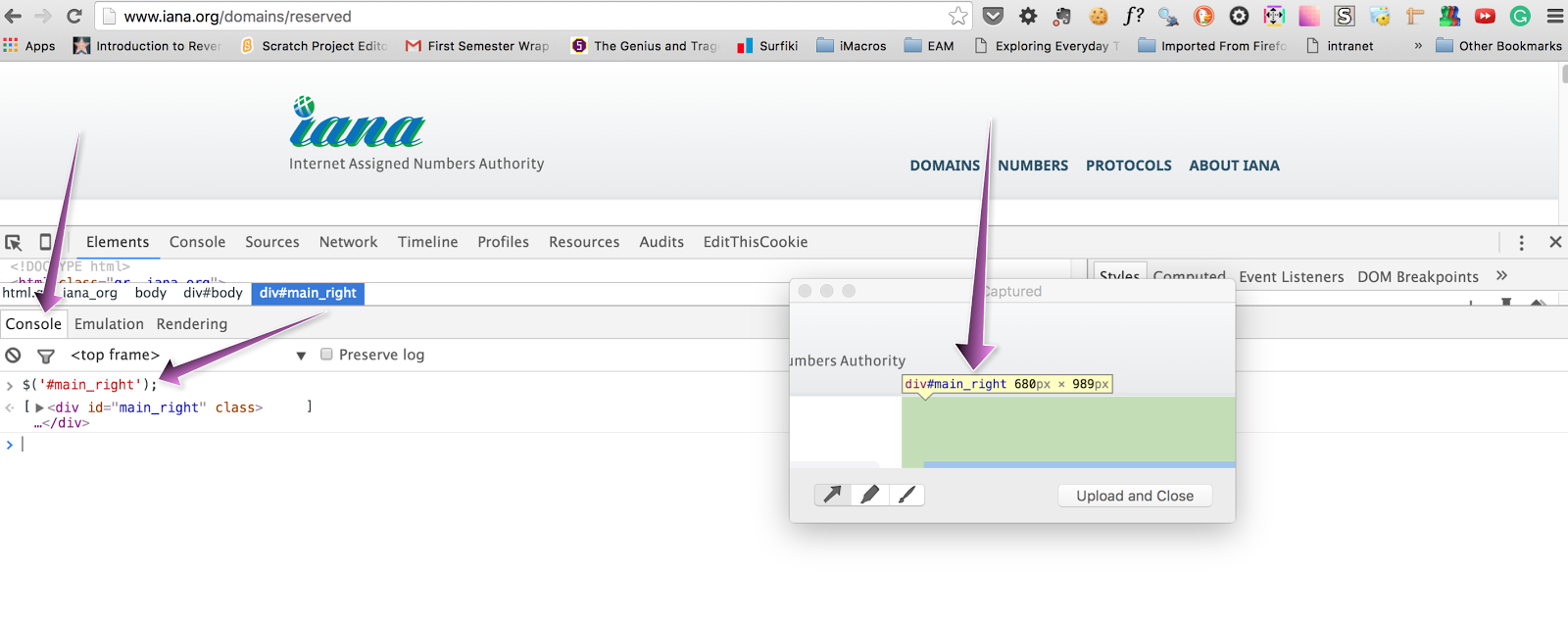
You'll notice that the 'id='main_right' is selected from the Elements tab, and also on the web page.  I love how Chrome Dev Tools automatically converts the 'id' into the correct CSS syntax '#'.  If you now take the highlighted id and use jQuery in the Console panel, you can tell if you are targeting only one element.  You don't want to accidentally target an element that returns more than 1 instance.

Here is how I easily check if I am targeting only a single element.

I took a picture of the highlighted element using the Captured app http://www.capturedapp.com/,  I then open the Javascript console tab, and use jQuery to target the element.  Here's how:


Type out the CSS Syntax to select the element, and click enter.


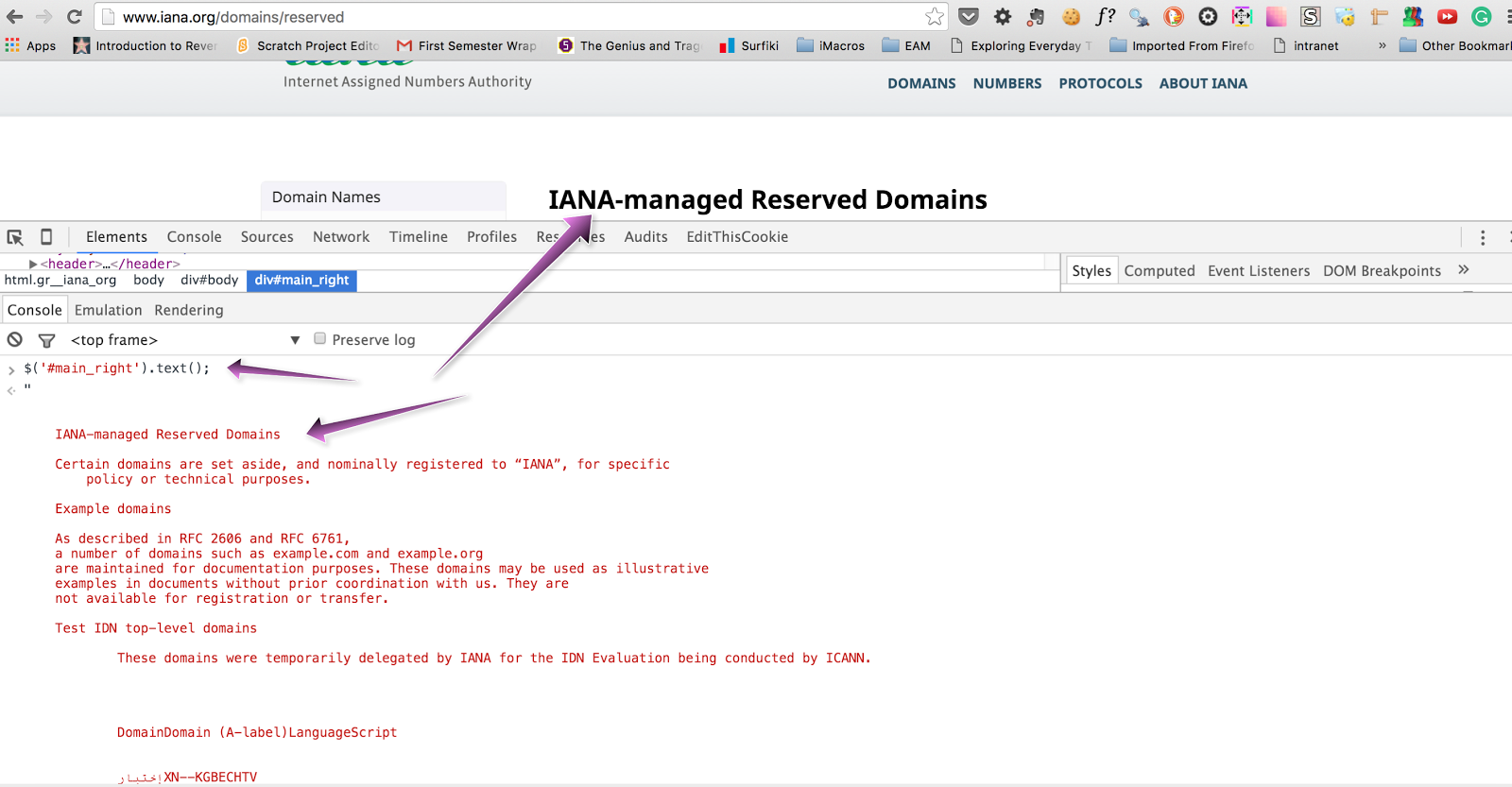
After clicking enter, if you only get 1 element returned in the array ( like above ) then you have selected the element correctly and won't have issues with multiple selections.  One other way to check if you are targeting an element correctly is to use '.text' to see the text that the element returns like this screenshot shows:


Option #3

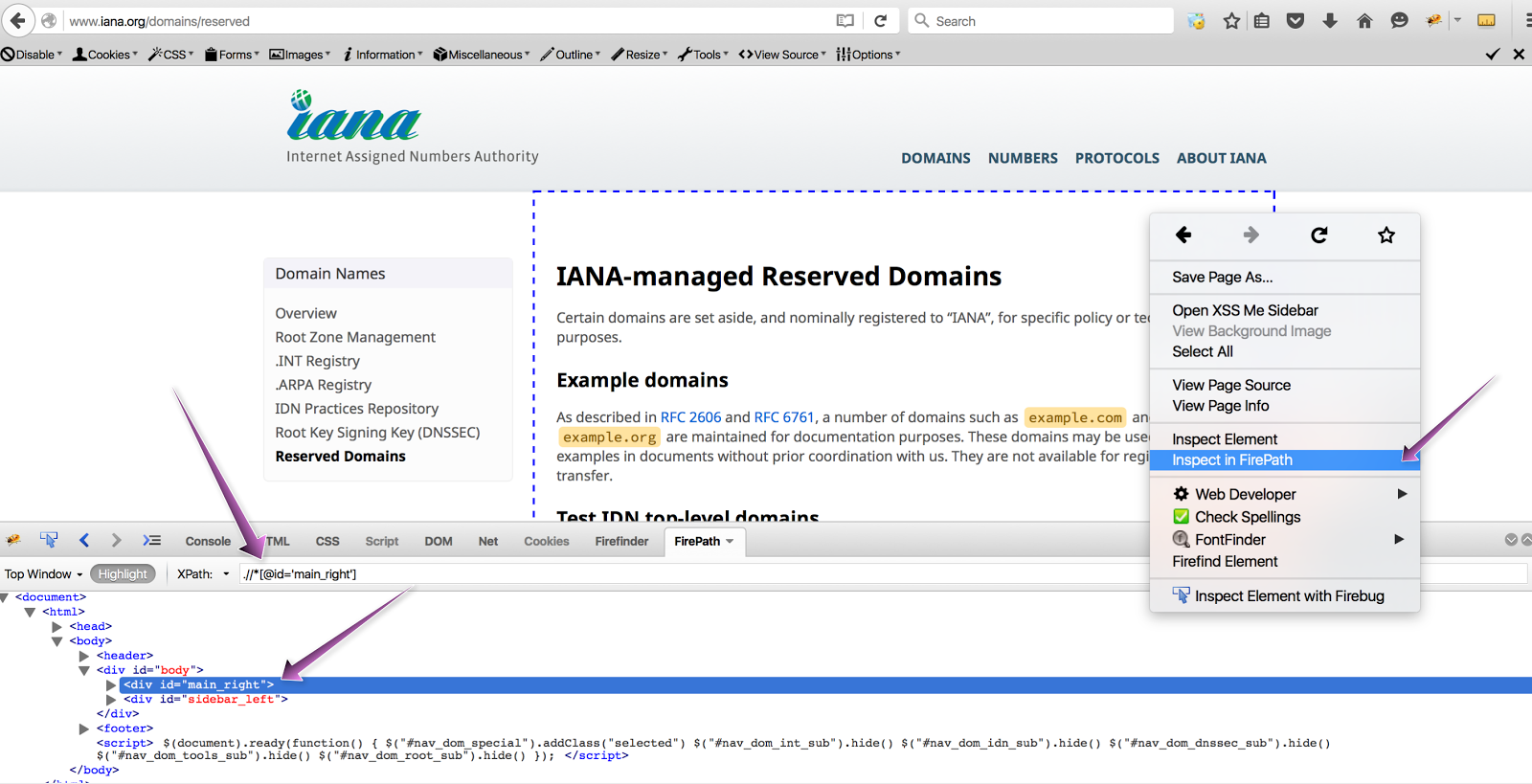
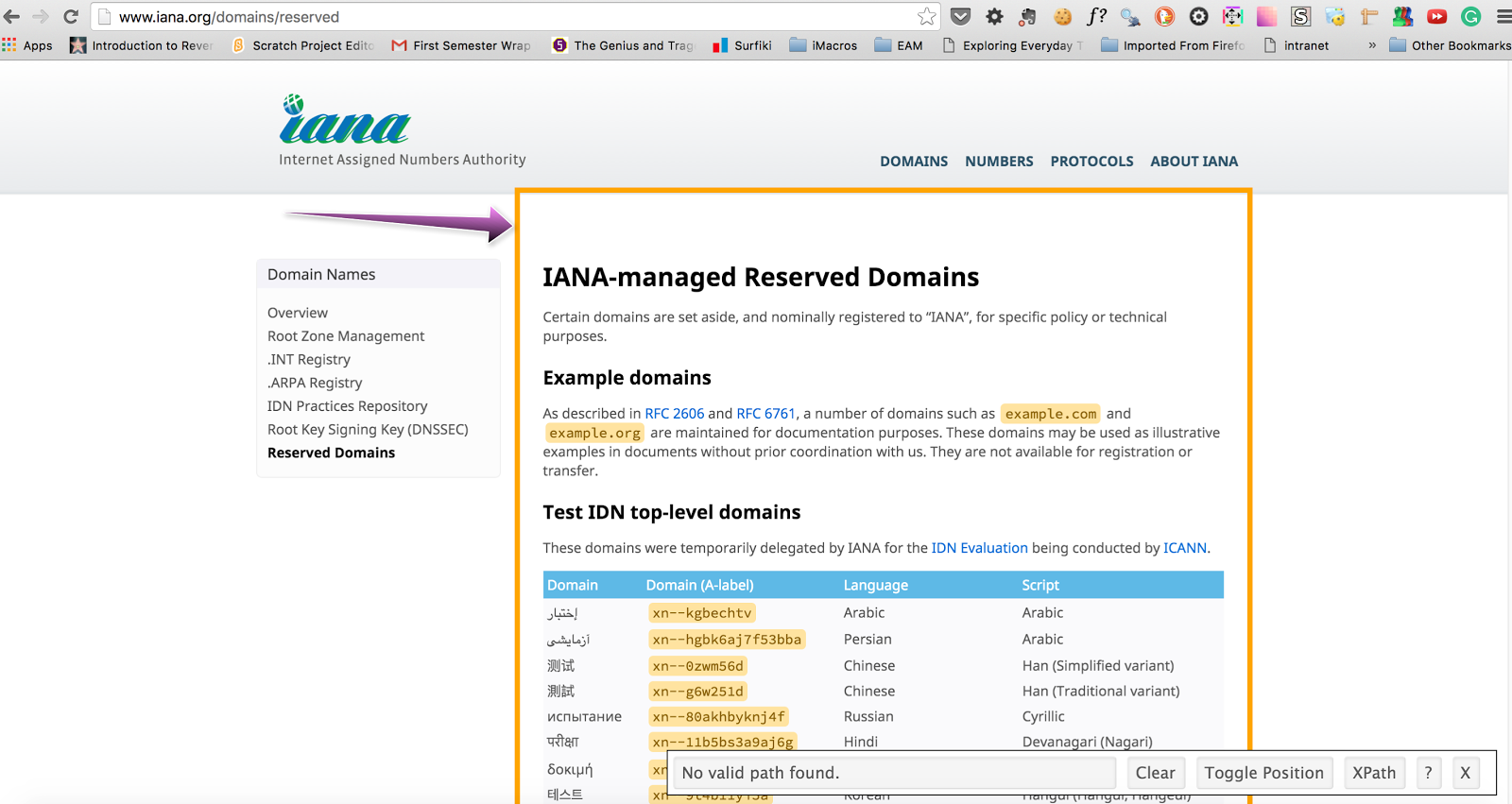
A very easy method is to use Firefox's addon, FirePath.  You simply right-click on any element and select 'Inspect in FirePath'.  You will instantly be given the exact, unique XPath for that element.


 There are several issues with this:

#1 XPaths run 2 - 3 times slower than a scoped CSS element.
#2 XPaths have to load the entire element each time they are called.
#3 XPaths are very hard to read and understand.
#4 XPaths have to load the entire element each time they are called.
#5 XPaths are very fragile, and break whenever anything on the DOM is changed.

XPaths are quick and easy to locate but there is a technical cost for choosing them.  With that said, sometimes there is really no other option than using a XPath.  I only use XPaths as a last resort.


Option #4

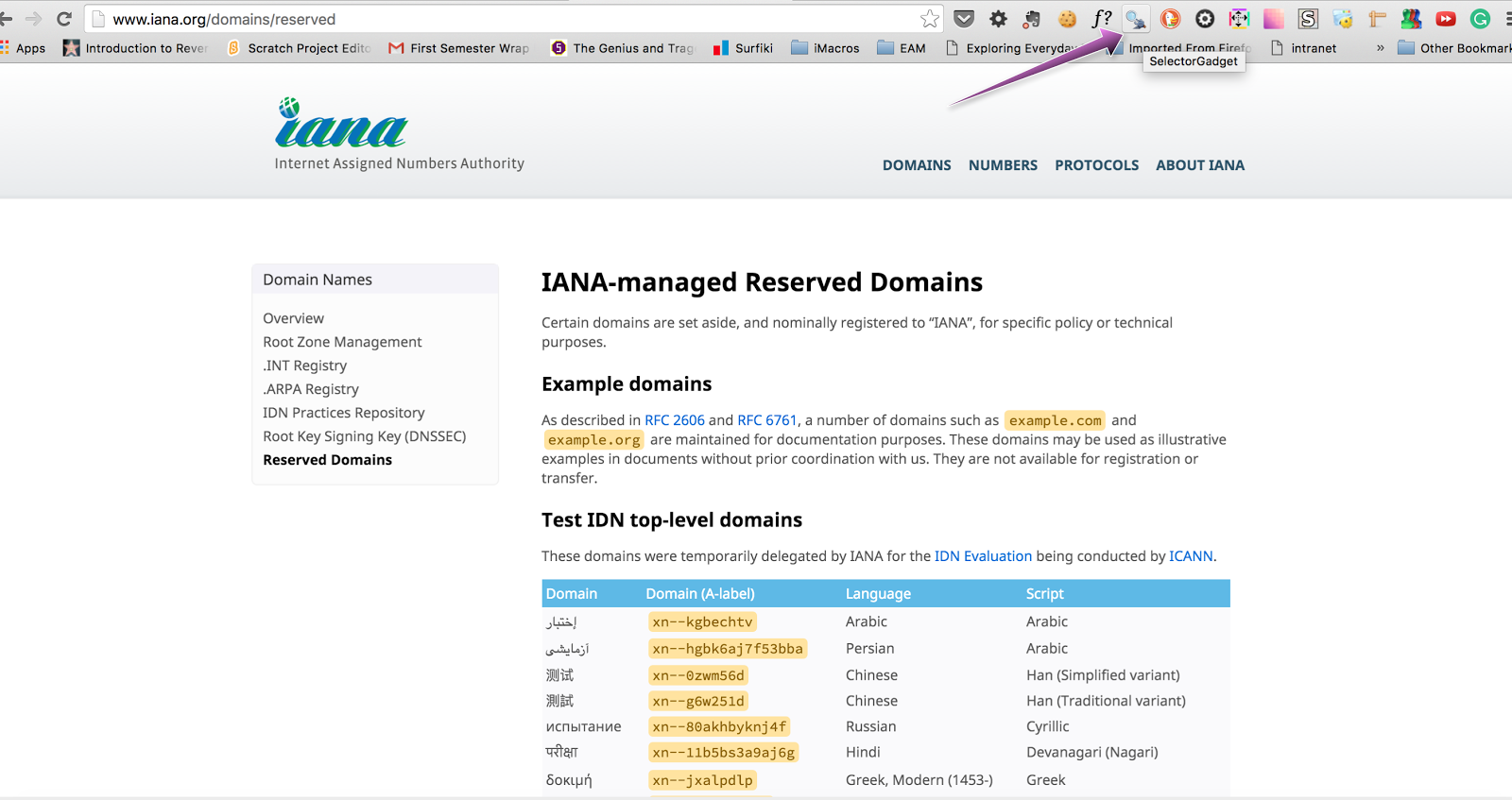
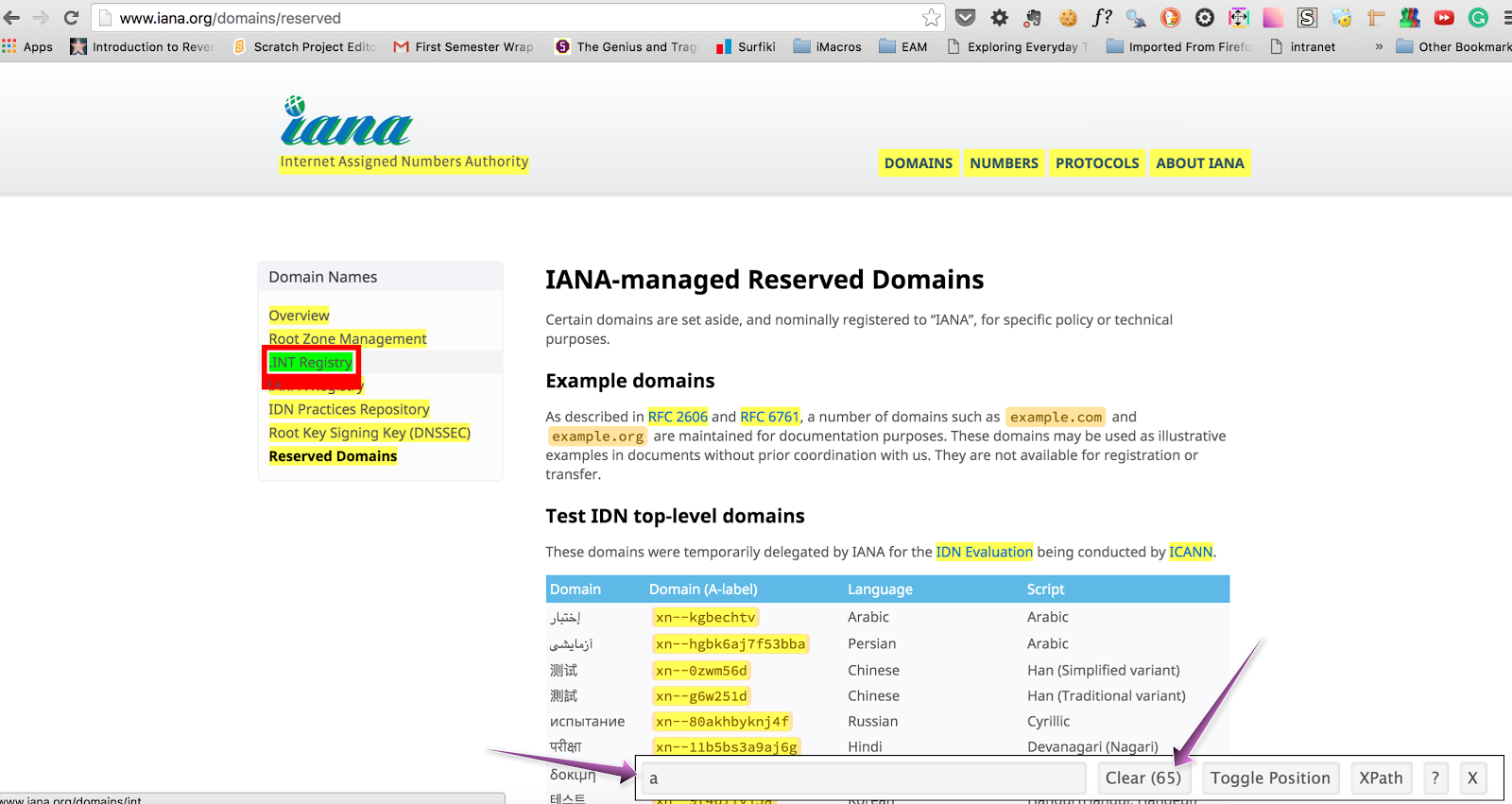
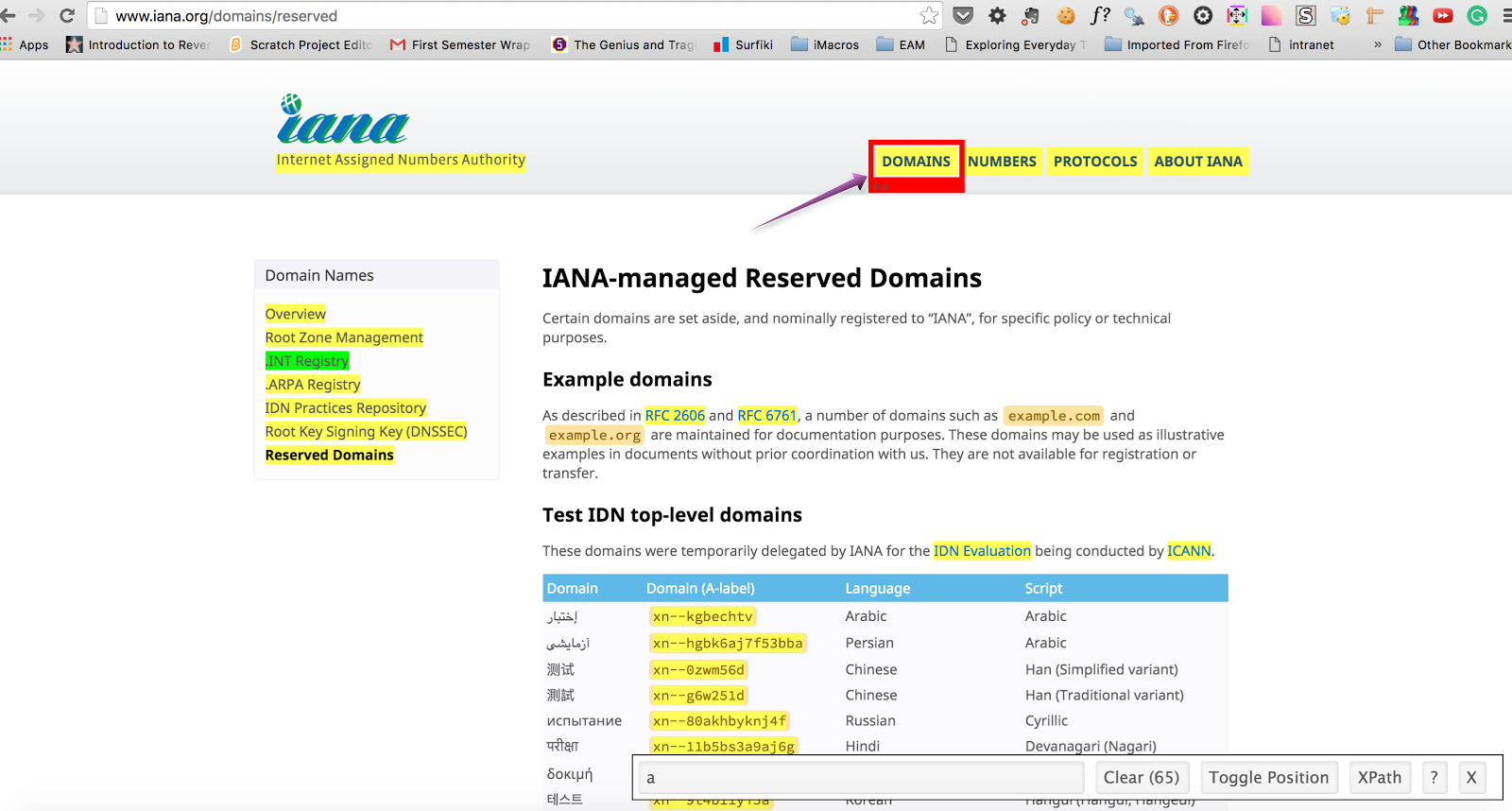
The last option is one of my very favorites when having issues with finding a hard to target element.  Selector Gadget http://selectorgadget.com/.  Selector Gadget is the closest thing to Html and CSS magic that I have ever come across.  Selector Gadget works by you telling it which element you want it to target.  It will then generate the CSS syntax that it thinks you want for the element.  Next, you will click on the elements in yellow that you don't want.  Selector Gadget will then adjust the CSS it generates until it only selects the 1 element that you are targeting.  Here are a couple of examples:

Click on the Selector Gadget Icon to get started


Next highlight and click the element that you want.


Success!  You have the CSS generated and can see that only 1 element has been targeted!


Here is another example:


Select the element you want to target.  Notice that the yellow shows all of the other elements that are going to be targeted as well.  You need to now 'train' Selector Gadget by clicking on one of the yellow elements, letting it know that you don't want to target it.


Success!  You will see that Selector Gadget has once again successfully figured out the element you are trying to target and generated the correct CSS syntax.


The only issue that I can find with Selector Gadget is that the CSS could be fragile is some cases with using of ':nth' but overall I highly recommend it!  Using the above methods, you should be feeling more confident in being able to handle targeting any tricky element situation that you run across.  I think Html and CSS 'noobs' should first try to target an element on their own. Then after  5 - 10 minutes if they can't figure it out, use Selector Gadget and learn the correct way to select the element.

Keep coding peeps, you can do this!


Wednesday, January 6, 2016

Things I like, things I do.

Hey All, I've been a little busy lately and have switched jobs since we talked last.  The only problem the longer I am employed at companies is, the less and less I can say about those experiences :-)  I thought I would share with you some of the things I read, and like.  The intent is that you can see what I do and hopefully some of it will help you in your own learning to code journey.


I believe your education never ends.  When people say they are "well educated" referring to their college education, I see it as offensive and slightly ignorant.  I believe you should never stop learning, and should always be improving your own education regardless if you are in school or not.

According to studies 85% of our success in the work place is due to 'human engineering', not your level of college education.  When I was 14 I said something to my Aunt Becky that she took as being rude.  Her husband called me later that night and told me how rude and offensive I had been.  My Aunt and Uncle had historically always given me cash for my birthday in a card that matched my age. For my 15th birthday instead of $15 in cash as I expected, I received a very worn out copy of Dale Carnegie's "How to win friends and influence people" and 1 single stick of gum...I guess I had bad breath too :-) 

I read that book 3 - 4 times, it changed my life.  I had no clue about how humans worked or what they liked or didn't like.  I know now at age 30 that my strongest asset is my people skills.  Most people that I have worked with, and most of my coaching student's weakest area is dealing with people.

Here are the books that have meant the most to me over the years.  Honestly, if I hadn't read them all, I don't think I would have ever been able to switch from a career as a Blacksmith/Farrier to one of writing Code.  There are many more good books, but I think all of the ones below would help anyone learning how to code.  Only 4 of the books below are code related though.  There are more great tutorials and resources, but if you completed just the 4 I mention, you would have enough technical ability for a junior Rails position, and know the basics of coding.

I think the most important tool that we have as a "knowledge worker" is our brain.  Which is why I do things every day to improve it.  For example I write left handed and use my mouse all day left handed even though I am a natural right hander.  I have high lighted the top 10 books I recommend if you only could pick 10.  I try to read at least 10 new books a year.  Last year I read 13.  NOTE: I don't make any money by recommending these books:


  • How to win friends and influence people - Dale Carnegie
  • The power of eye contact - Michael Ellsberg
  • No More Dreaded Mondays - Dan Miller
  • Secrets of a Buccaneer-Scholar: How Self-Education and the Pursuit of Passion Can Lead to a Lifetime of Success - James Marcus Bach
  • Whole Brain Power - Michael Lavery
  • The Education of Millionaires: Everything You Won't Learn in College About How to Be Successful - Michael Ellsberg
  • The Choose Yourself Guide To Wealth - James Altucher
  • Rhinoceros Success - Scott Alexander
  • How to Have Confidence and Power in Dealing with People - Les Giblin
  • Anything You Want - Derek Sivers
  • What Every Body is Saying - Joe Navarro
  • The Compound Effect: Jumpstart your income, your life, your success - Darren Hardy
  • The ONE Thing - Gary Keller
  • It's Not How Good You Are, It's How Good You Want To Be. - Paul Arden
  • Quitter: Closing the Gap Between Your Day Job & Your Dream Job - Jon Acuff
  • The Art of Non-Conformity: Set Your Own Rules | Live The Life You Want - Chris Guillebeau
  • The Magic of Thinking BIG - David J. Schwartz, Ph.D
  • WIN: The Key Principles to Take Your Business From Ordinary to Extraordinary - Dr. Frank Luntz
  • The Real You - Dr. Kevin Leman
  • Eat That Frog! - Brian Tracy
  • How to Think Like Einstein: Simple Ways to Break the Rules and Discover Your Hidden Genius - Scott Thorpe
  • Learn To Program - Chris Pine
  • Michael Hartl's Rails Tutorial
  • Whys Poignant Guide To Ruby
  • In The Beginning Was The Command Line - Neal Stephenson

Things I do to daily/weekly to improve myself:

If you read Whole Brain Power and agree with what he says about the overall benefits of becoming ambidextrous, and how it improves your overall brain function.  Then these next few things will make sense to you, otherwise you will think me a bit weird :-)

  • I use my mouse at work left handed the entire day.
  • I bounce a golf ball off of very small hammers and also off of very heavy hammers several days per week.
  • I convert license plate numbers into pictures using Phonetics.
  • I convert the letters into numbers, and then into pictures.  For example DE would make the number '45' which would convert to the picture of a Rail Road Track.  ( Look up the Majors memory system if you want to know how it works )
  • I close the number 1 Grip Crushers = 140 pounds of force to close, every 2 days ( most weight lifters can not close it )
  • If I need to take notes in a meeting I make sure I write them down and that I do it with my left hand.
  • I go to the acupuncturist once per week for needles and cupping.
  • Read a part of a book each night or work on my Rails app.
  • Basically do everything as much as possible left and right handed, for example when I was at Fidelity I would play 2 games of ping pong after work most nights.  I would always play one game right handed and the other left handed.  I consistently beat people with my left hand.
  • Always lots of goals, some huge goals, and then 1 or 2 crazy outlandish goals that I don't tell anyone or else they laugh at me.  I think that keeps me very positive when thinking of the future and full of energy to welcome the start of a new day.

All the above may be weird, I personally think they help me learn quicker and keep my brain as healthy as possible.  I don't mind doing weird things as long as they work.  Most very successful people do things that others might consider strange or unusual.  My motto is when I see what everyone else is doing, I go the opposite direction.  How can you have remarkable success in life if you merely follow what everyone else does?  How can you be anything but normal if every night you simply watch Netflix?  Oh yeah, I don't watch much T.V. either :-)

Keep coding peeps, you can do this!

Wednesday, December 16, 2015

My last coaching client just got a Junior Dev paid internship

Hey All, So I am either lucky, or good at getting people hired :-)  The last Coaching client that I currently have just got offered a paid 3 month junior dev internship at a company in Baltimore MD.  I really am sad to not have anymore coaching clients at the moment :-( 

I will update the testimonials section of my blog with each of the last 3 coaching clients stories by the first of the year. 


Here are some of the thoughts and things I have learned over the past 6 of months coaching:


1. I think that I could really help people who already know how to code but haven't been able to land a job.  I think I could help them land a job in 1 month.  Email me if you want to hear more.


2.  I love coaching people to land jobs.  I really get SO excited to help people break into the coding world. It's thrilling to hear how excited they are when they actually get the coveted job offer!  Coaching is my passion, I want to keep doing this for as long as people will keep hiring me to help them get hired.


3.  People don't value free coaching.  I offered to coach 4 people for free, to give back and help them land jobs.  All 4 of them quit within 2 - 3 months of starting coaching.  No matter how much I screened people, no matter how motivated and passionate they said they were, not one even completed the 4 months of coaching.  No matter how many emails I sent or how many hours I spent helping them they all quit.  I never would have guessed this would happen and this is something that shocked me.


4.   Every person who has paid me to coach them has landed a job and none of them took longer than 4 months.  Not bragging, just a true fact that I am proud of.


5.  The biggest problem I see is that there are too many resources and people just think if they take a ton of tutorials, some company is going to hire them.  They have no plan for how to actually get hired.  Everyone should read this article:

Why Emotionally Intelligent People Are More Successful

Basically it talks about what I have observed as the key to landing a QA or coding job:

The Carnegie Institute of Technology carried out research that showed that 85% of our financial success was due to skills in “human engineering”, personality, and ability to communicate, negotiate, and lead. They found that only 15% was due to technical ability. 


6.  The ultimate key to getting hired is being truly remarkable and standing out from the crowd, it's that simple.


Keep coding peeps, you can do this!!!